Empty Content View
Display an empty state when there's no content to show. Perfect for empty lists, search results, or initial states.

EmptyContentView(
    icon: "magnifyingglass",
    text: "No results found"
) {}
Copied!
With Additional Text
You can provide additional context text below the main message. This is useful for displaying supplementary information like IDs or reference numbers.
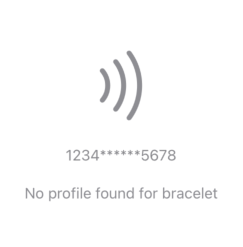
EmptyContentView(
    icon: "radiowaves.right",
    text: "No profile found for bracelet",
    additionalText: "1234******5678"
) {
    // Custom content here
}
Copied!
With Custom Content
The trailing closure allows you to add custom views below the empty state message. This is perfect for adding action buttons or additional UI elements.
The closure content is rendered below the icon and text, making it ideal for action buttons or additional information.
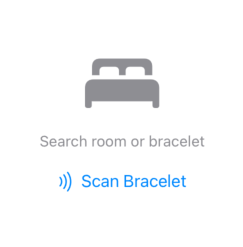
EmptyContentView(
    icon: "bed.double.fill",
    text: "Search room or bracelet"
) {
    Button(action: {
        // Handle scan action
    }) {
        HStack {
            Image(systemName: "radiowaves.right")
            Text("Scan Bracelet")
        }
    }
}
Copied!