Tags View
Display a horizontal scrollable list of tags. Each tag can have an icon, image, text, and custom colors. Perfect for displaying categories, labels, allergens, or any categorized information.

TagsView(tags: [
    Tag(text: "Label", color: .blue),
    Tag(text: "Category", color: .green),
    Tag(text: "Tag", color: .orange)
])
Copied!
Tags with Icons
Add SF Symbols icons to tags using the icon parameter. The icon appears before the text.

TagsView(tags: [
    Tag(icon: "person.fill", text: "User", color: Dejavu.brand),
    Tag(icon: "star.fill", text: "Favorite", color: .red),
    Tag(icon: "leaf.fill", text: "Eco", color: .green)
])
Copied!
Tags with Images
Use custom images instead of icons. Images are automatically resized to 18x18 points.

TagsView(tags: [
    Tag(image: Dejavu.image("allergens-1"), text: "Allergen", color: .purple),
    Tag(image: Image(systemName: "person.fill"), text: "Custom", color: .green)
])
Copied!
Custom Foreground Color
Customize the text and icon color using the foregroundColor parameter. Defaults to white if not specified.
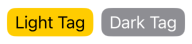
TagsView(tags: [
    Tag(text: "Light Tag", color: .yellow, foregroundColor: .black),
    Tag(text: "Dark Tag", color: .gray, foregroundColor: .white)
])
Copied!
Using TagView Individually
You can also use TagView directly to display a single tag without the horizontal scroll container.

HStack {
    TagView(Tag(icon: "star.fill", text: "Featured", color: .yellow))
    TagView(Tag(text: "New", color: .green))
}
Copied!
Complete Example
A real-world example showing how to map data to tags, such as displaying customer allergens or preferences.

let allergens = ["Peanuts", "Gluten", "Dairy"]

TagsView(tags: allergens.map { allergen in
    Tag(
        image: Dejavu.image("allergen-icon"),
        text: allergen,
        color: Dejavu.backgroundDarker,
        foregroundColor: Dejavu.textPrimary
    )
})
Copied!